Monday, January 16, 2012

Innovation - by Shirley


Innovation.....

Definition:   1. the introduction of something new
                     2. a new idea, method, or device

There was a recent chat on twitter #isedchat about what constitutes an innovative teacher, classroom and school. It made me really think about how much my style of teaching has changed in the past few years and how lucky I am to be teaching in a school that allows for innovation and has encouraged me to be innovative.
I am in no way an expert in technology but using technology has enabled me to help my students create, collaborate, share globally and teach others around the world. Yes, the technology tools are only that – tools, but they have helped created the innovation in my classroom and that in turn has encouraged much more independent thinking and doing by my students. I have taken a back seat more and more and see myself not as a teacher but as a facilitator who guides, models and encourages students to take charge of their own learning.

We use a variety of social networking tools in class including our class blog, our Twitter account @pds6th, Skype, Edmodo, Class Wikis - Crispin and Our Ancient Greek Studies

So what have my students accomplished with these tools that is innovative? 
How about these three examples… 

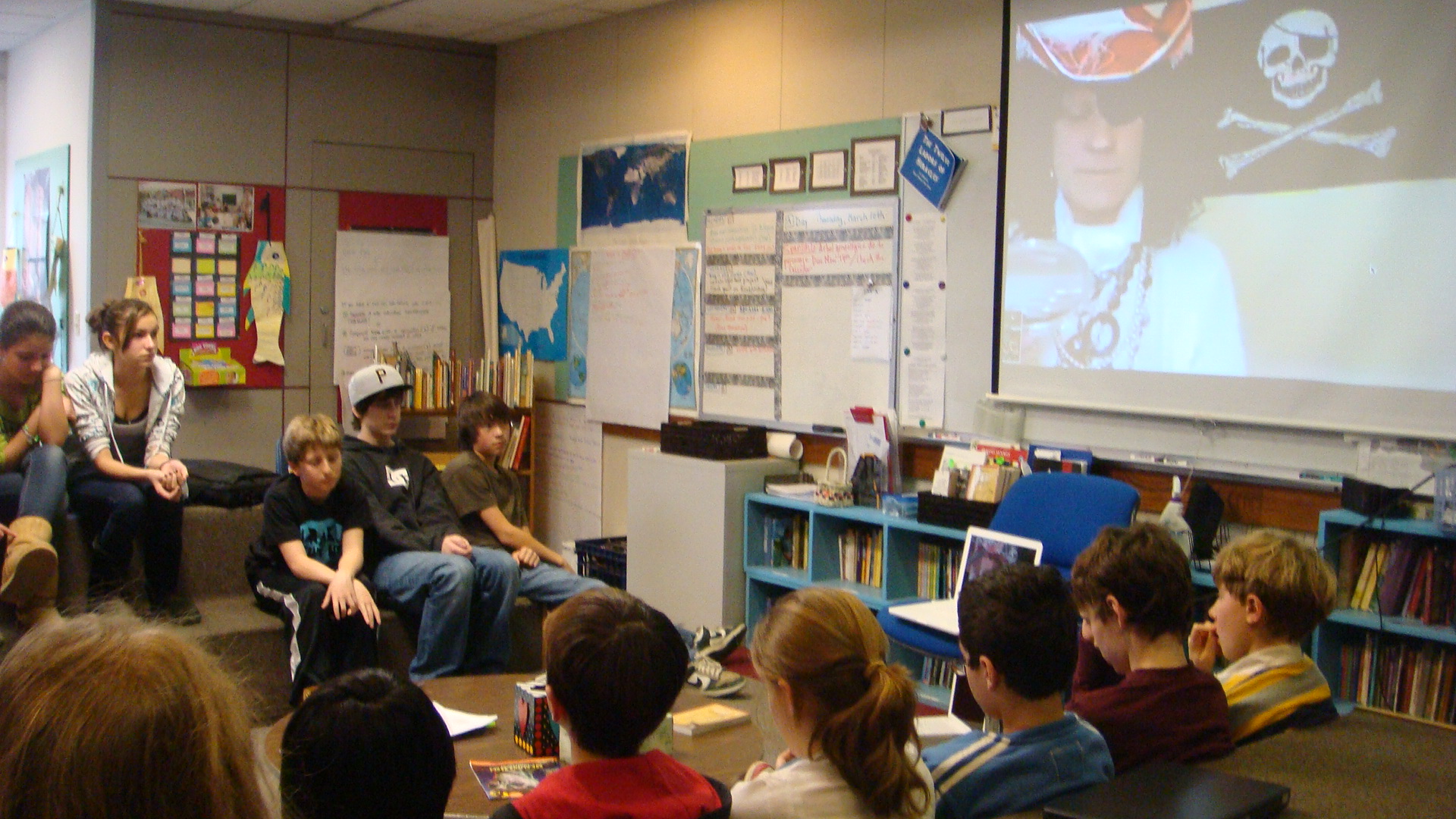
1.  A group of our 6th and 7th graders from Poughkeepsie Day School in New York experienced some exciting real life learning when they participated in the ITU Telecom World 2011conference from Geneva, Switzerland titled, Visions of a Networked Future. Students sat enthralled watching and listening to the innovative speakers’ predictions about the future of technology, sometimes agreeing and also disagreeing with the panel’s ideas. They then rapidly fired inspiring questions to the panel of expert futurists through a Twitter feed, which were then answered by various members of the panel. This was an amazing example of how technology can make it possible for students and experts around the world to discuss and share their ideas. Our classroom truly has no walls……

The panelists were…

Gerd Leonhard... CEO,The Futures Agency,Switzerland
Juliana Rotich... CEO, Ushahidi Inc., Kenya
Rachel Armstrong... Senior TED Fellow, Senior Lecturer, University of Greenwich, United Kingdom
Rohit Talwar,... CEO, Fast Future, United Kingdom
Simon Torrance... Founder 2.0 Initiative, and Chief Executice Officer, STL Partners, United Kingdom

It was a great class and now Rachel wants to Skype with us and talk more about the future....


Some students views...


2. 6th grade students from PDS enjoy blogging and welcome comments, ideas and suggestions from other students around the world. They recently took part in a student blogging challenge organized by Edublogs and met each challenge with excitement, enthusiasm and a variety of wonderful posts and web2.0 tools. They are now participating in a Quadblogging project with three schools from the UK. 

Here is our blog page telling the world all about it....

Quadblogging in 6th Grade 

We are excited to take part in the QuadBlogging project for January and February 2012.

Here is a video explaining what we will be doing…


These are the three other schools we will be visiting through blogging. We uses Google earth to find these schools and will also Skype  and get to know each other as students and bloggers. The other schools will be browsing and commenting on our blog the first week. The following three weeks we will browse and comment on each of the other schools' blogs.  We also hope to do some collaborative writing with these schools.


Here are the first two comments from the UK... 
Nell and Rykiya Said, 
January 10, 2012@ 5:35 am       
Hello ,We wil be quadblogging with your school in 1 or 2 weeks 

Naomi & Ceri-lee Said, January 10, 2012@ 5:36 am       
We really liked how you put lots of pictures and video’s on your blog and now I can finally see
how different our schools really are! Great work.
We love how you made litte avatars for when you comment on something. It’s brilliant!!! 


3.     6th and 7th grade students at Poughkeepsie Day School are involved in the 20/20 NAIS Challenge, which is a team problem solving activity.  We are working with schools in Spain,  Argentina and the USA to help solve the real global problem of Education For All by finding solutions that can be implemented at the local area as well as globally. We use Skype and wikis to collaborate, plan and share our ideas and projects.  Here are links to our wikis explaining what we are doing…
This is a voki introducing one group of students.. 
     Are these 6th graders being introduced to something new, a new idea, method, or device? What do you think?                


Tuesday, October 18, 2011

Some Ways to Support Teachers Learning Technology by Laura

Earlier this month, I was invited to spend the day with a team of teachers that has volunteered to be their school district's technology team.  They are committed to working together this year to learn more about teaching with technology and to begin to implement more technology in their classrooms.  The district has contracted with the Hudson Valley Writing Project, which asked me to spend some time with them.

I coined the term "Dream Team," after working with them for just a short time.  These teachers were excited and a bit nervous, but each one had hope, curiosity and enthusiasm for what the future might hold.  The day led me to be thoughtful about what can make the adults in a school embrace the incorporation of technology, and here are some ideas from my own experience and from my experiences working with other teachers:

Working with a small, eager group is a great way to build enthusiasm and support. 
My own school piloted its 1:1 laptop program with the 7th and 8th grades, and many teachers of the other grades became enthusiastic about adding laptops to their students' lives as the 7-8 team met with success.  Being part of a pilot group meant the teachers could easily find each other for support and ideas.  That first year, the technology support staff really had the piloting team as a priority and we were able to set up routines and troubleshoot without stretching that personnel too thin.  Teachers and students were excited and, felt special and supported.  Together we helped to create a buzz about the future during the first school year of the program.

Student work is the best promotional material possible. 
With all due respect to innovative blog writers, educational theorists, and the  21st Century booster club, good teachers will understand why they should add new methods to their classes when they see student work with their own eyes.  Whenever I present, no matter what I say or how many times I manage to make the audience chuckle, the light always begins to shine in the participants' eyes when I begin to show student work.  Teachers are professionals and experts, and we like to make up our own minds.  Showing student work makes this possible.


Classroom management with technology isn't what teachers seem to worry about.
This has been a happy realization.  I have heard teachers, who want to include technology more, agonize over restrictions placed on them by school administrators.  Because of this, I had the impression that teachers must have concerns about student behavior.  It's not the teachers who are concerned, though!  Teachers that do professional development are good teachers.  They understand how to manage a classroom and they understand how to keep students focused on the work at hand.  Because their classrooms are well run, the presence of laptops rarely encourages students to stray off task more than they would given any other type of material or equipment.  Professional development that is focused on how to assign meaningful student work using technology takes care of almost all the classroom management issues.

Honesty is the best policy
Every group of adults I have spoken to, formally or informally, seem to eventually ask the question, "How do you have time to learn all of this?"  The honest answers:  I take the time.  I do work outside of school hours (don't all teachers?)  I do sometimes give priority to learning a new technology instead of, say, responding to student work super fast.  I also get help from others, and from my students.  And, I can honestly guarantee that for every new technology a teacher learns, learning the next one is faster.  Being a life-long learner means plunging in, and that is well worth modeling for students.  Learning something new makes my whole life better, not just my school life.  So, the time I use is as much an investment in myself as it is an investment in my students and my school.

The trials and successes in the adult community of a school certainly set the stage for the experience of the students. My own experience, and likely my whole career,  would have been different if I hadn't been in a school that values professional development tremendously.  So, my last BIG point:  Find good professional development, cultivate a support network, and support teachers who do so.

Sunday, October 2, 2011

Teaching, Changing, Doing - by Shirley


As a 6th grade humanities teacher, I am always thinking about my curriculum, my teaching and my students. Questions are always flying through my mind and making me think more about my teaching and what is important to me. Here are a few random thoughts…

What can I do better? What adjustments should I be making? Are my classes interesting? Do I create fun projects and activities?  Are my students challenged in as many ways as possible?  Do my students make their own decisions? How important is the content curriculum? The questions are never ending but always evolving.  I have come to some conclusions that I would like to share….

Teaching is an ever-changing profession and it is essential that we as teachers keep up with everything new, thought provoking, interesting and challenging. How do we do that and stay abreast of this rapidly changing world of education? We need to be following the paths of really great educators but doing it in a way that does not take hours more of research, planning etc. The first step for me is the building of a useful Personal Learning Network (PLN) involving my colleagues, my Google reader, and my Twitter friends. A few minutes a day and my network continually grows as I learn about new web 2.0 tools, read about useful ideas from other teachers as well as sharing what works for me with fellow educators all over the world.

As the world changes, so do the expectations and goals for students and educators in this 21st century of learning. The differences are vast between what I thought was important over 30 years ago when I began teaching, and what I believe in now. I wish I knew then what I know now...

The following poem, written by Lee Crockett, Ian Jukes and Andrew Churches and found on Tony Gurr's All Things Learning blog has given me more food for thought…

                                                                
                                                      What is a Teacher?
A guide, not a guard.
What is learning?
A journey, not a destination.
What is discovery?
Questioning the answers, not answering the questions.
What is the process?
Discovering ideas, not covering content.
What is the goal?
Open minds, not closed issues.
What is the test?
Being and becoming, not remembering and reviewing.
What is learning?
Not just doing things differently, but doing different things.
What is teaching?
Not showing them what to learn, but showing them how to learn
What is school?
Whatever we choose to make it.


With this poem in mind, this is what I will strive to do this year…
  • Talk to my students about everything under the sun and get to know them better as individuals and as learners
  •  Listen to what my students have to say. That means making time to listen not just in the classroom but in the hallways, in the lunchroom, outside at recess, etc. etc.

Students Speak out about what they need in education –


      • Be very clear with my goals and expectations for every project, activity, homework assignment or class work 
      • Give more decision making, choices, planning, sharing, teaching over to the students 
      •   Do Not talk too much and have the students dooooo more

            • Continue my technology journey with the students and learn and share together
                •  Give more time to asking the students what it is I can do to help them
                    • Involve and educate parents more in what goes on in my classroom 


                    What are you as an educator striving for this year ?


                            Thursday, September 1, 2011

                            Decisions to make......by shirley


                            Vacation is over and another new and exciting school year is about to begin. For me this has meant reflecting, rethinking, planning and organizing for the coming year.  My classroom consistently changed this past year as I introduced daily use of laptops, went almost paperless, encouraged my students to reach out globally and handed much more planning, creating and teaching over to the students themselves. I have been thinking carefully about the pros and cons of these changes so I can plan for a productive and stimulating year of Global Medieval Studies for all of my 6th grade students.

                            Most of my 6th graders owned their own laptops last year and those who did not had access to a laptop cart. This was the first year of our school using a Google platform so everyone had access to a Google Email and many Google Apps. It was the year to try some new applications and web 2.0 tools.

                            The year began by spending time setting up iGoogle for each student with Email, Calendars, Sites and Google Docs. The students enjoyed being able to chose what to have on their pages and arrange their different choices. Email worked well for whole class or individual student communication and for sharing last minute changes in schedules, homework questions etc.  It tended however to be a one to one communication tool and rather clumsy for collaboration between groups of students. Google Docs on the other hand worked very well for everyone and students loved having all their writing in one place either to share with their group members or me.  It was so simple to edit, comment etc using Docs and quite fun when students would see me writing a comment while they were working at home. They could also share their work with other students and work collaboratively with each other.  After over thirty years of teaching using paper journals I made the switch and student journal writing was also created on Google Docs. Many of my students stated that Google Docs was the most favorite and useful tool they used last year. This coming year I want to expand and include Google Reader for each student, and take the next step in working towards students building their own personal learning networks.

                            Having all this great writing led me to create a class blog so students could publish their work for a global audience to read and comment. Instead of printing copies and sharing within our own community students decided to publish most of their work on the 6th grade blog. We used Edublogs and participated in the Edublogs challenge.  What a wonderful learning experience for all of us as we created guidelines, pages, categories, added widgets, pictures, videos and slide shows. We experimented with Vimeo, Animoto Voicethread and Vokis to share our thoughts, information and ideas in a variety of ways. Students were delighted when others commented on their work. We had great communication with Turkish university students learning English through our blog and met some new friends from The School at Columbia. Our cluster map grew rapidly as we read and commented on students’ work from around the world and they replied to us. I can’t wait to begin again with a new group of students, try some more new ideas and help guide them towards being competent bloggers.

                            Our studies last year focused on Ancient Greece and some of the students asked if they could share their knowledge and projects with other students globally, so we decided to create a class wiki. Students worked collaboratively on different units of study to plan, create and share their knowledge, not just with their classmates but also with anyone globally who was interested in their topics.  Groups could create links to each other’s pages, give advice on each group’s units and work on editing together. A wiki is a wonderful social media tool for real collaboration between students and gives a great sense of independence and responsibility. I will certainly continue using wikis next year to create a variety of projects.

                            Skype was a tool we used often with several schools around the US and also as far afield as Scotland. Students began to see themselves as ambassadors of their school, their class and their learning.  They learned a lot about the difference between rural and urban schools and about how students love sharing many things about themselves. Communication skills became very important and it was essential to prepare before our online sessions. We also used Skype for students who were out sick or on vacation. They could continue to participate in discussions, group projects, partner work and individual writing,
                            Skyping with Bill Boyd in Scotalnd


                            Edmodo was a both successful and disappointing social media tool. Many students loved the look and feel of it, as is it similar to face book in its format.  We used it on snow days when school was closed and we wanted to continue our learning together. We decided on a time for each class to meet and I set up group pages. The format was not great to use with so many people at a time and I think I have to rethink if this is the best platform to use. If I can work out the kinks, perhaps the second time around will be smoother.   
                             

                            So what did I learn through this whole process??

                            1.     Technology empowers students (all students at different times, using different tools that they can choose)
                            2.     Students learn best by taking on more of their own learning (decision making, planning, creating and sharing)
                            3.     Listen to your students…they know themselves pretty well in many areas of their learning
                            4.     You do not have to be an expert to be successful with technology, just a willingness to try some new things
                            5.     Learning alongside your students is a great experience
                            6.     Real life learning gives students the desire to excel in many areas
                            7.     Collaboration helps all students become more independent and responsible learners
                            8.     Technology does not take more time, it is just a different style of teaching

                            I certainly changed my style of teaching by trying out these new ideas and I think it was well worth it. I learned a lot about my students and myself. I saw engaged, enthusiastic and empowered learners. When I look back at the standard of writing and the passion to succeed I saw in my students last year, I am convinced that last year’s changes were positive, rewarding and the way I want to continue my teaching.